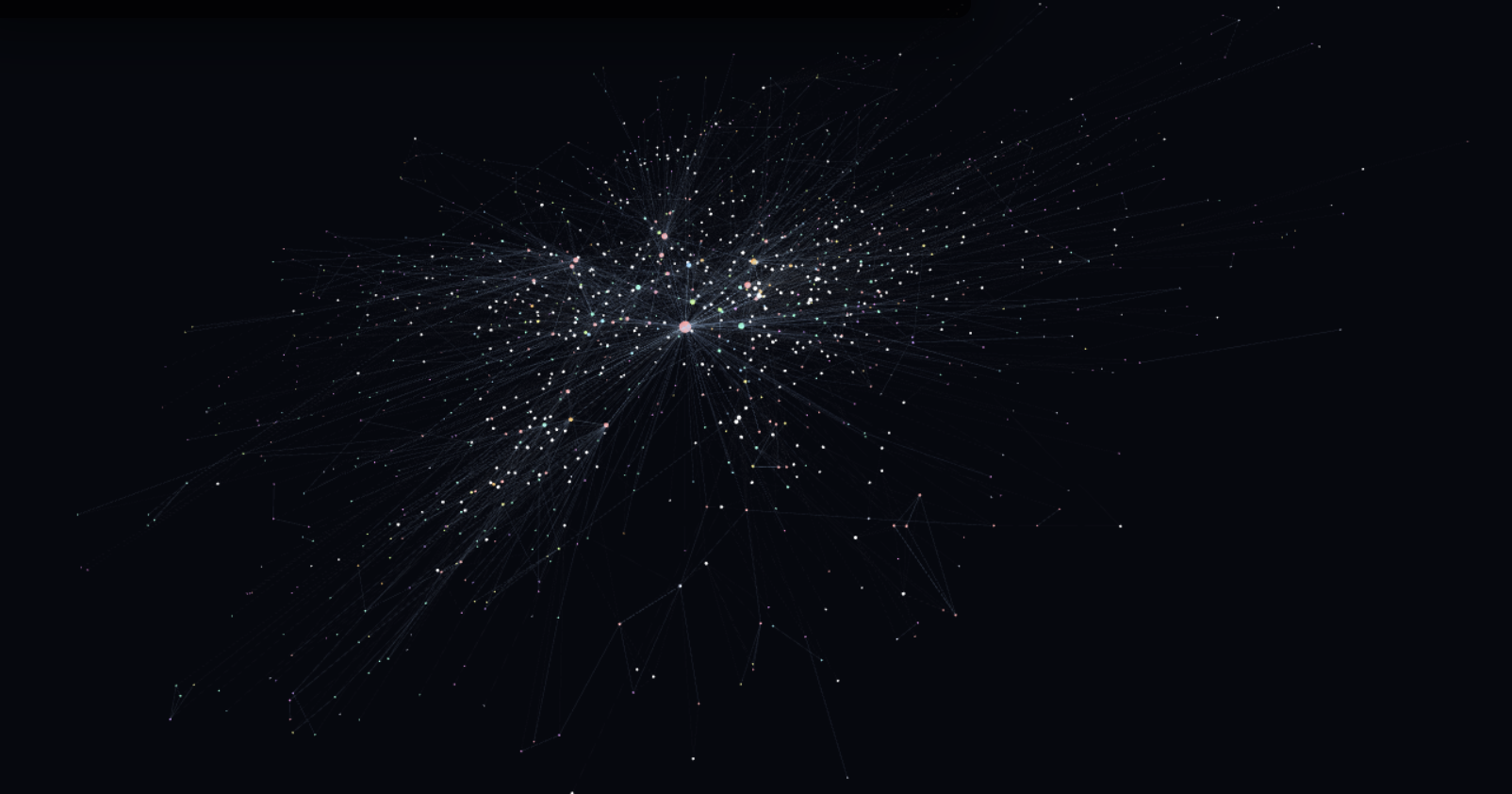
The graph in its final state, laid out in 3D. Recurring characters and ships cluster in the centre; the long tail is everything mentioned only briefly.
I have recently been learning about AI ingestion pipelines and decided I wanted to see if I could build a knowledge graph of something mostly non technical. I wanted to map out one of my favourite books, We Are Legion (We Are Bob) by Dennis E Taylor into a FalkorDB knowledge graph. I used a local Qwen3.6 model to scan sections of the book and extract characters, storylines, chapters and other aspects into a cohesive graph. I expected/wished that the graph would end up being clear enough that the main character’s Von Nuemann probe clones would perhaps be visible in the structure of the knowledge graph when modelled in 3D.
The final snapshot has 1,379 nodes and 4,601 edges. Of those, 392 nodes are scene-level episodic records, 987 are canonical entities, 3,361 edges are MENTIONS, and 1,240 edges are typed relationships between entities.
The shape of the graph
I initially asked the LLM to check and compose sections of the book into the following labels
| Label family | Sections |
|---|---|
| People and groups | Character, Faction, Organization |
| Physical things | Ship, Tool, Structure, Resource, Location |
| Design systems | Skill, Capability, Technology, Tech_Node, Research |
| Narrative structure | Scene, Event, Plot_Arc |
Relationships use a small canonical vocabulary: REQUIRES, UNLOCKS, PRECEDES, USES, OWNS, LOCATED_IN, IS_PART_OF, LEARNED_FROM, and the rest of the edges needed to express a tech tree or tutorial sequence.
The graph also keeps an Episodic node for every scene. Entity nodes represent canon objects. Episodic nodes represent where the extraction came from.
MATCH (scene:Episodic)-[:MENTIONS]->(n:Entity)
WHERE n.name = 'GUPPI'
RETURN scene.chapter, scene.scene, scene.summary
Phase one was too serial
The first version used Graphiti’s normal ingestion loop for chapters 1-11. It worked, and it left me with a useful seed graph: 403 nodes, 1,345 edges, and a catalog of entities that already had UUIDs, labels, summaries, and embeddings.
It was also too slow for finishing the book. Graphiti’s extraction path is good when you want the framework to own the whole process. Here I wanted a bulk import pipeline with checkpoints after every stage, so I could rerun one failed piece without reprocessing everything before it.
The second version bypassed Graphiti’s serial extraction loop and wrote directly to FalkorDB. The old graph became the catalog. Everything after chapter 11 went through a faster parallel pipeline and then merged into the same bobiverse_canon graph.
If a model call failed, I did not have to wonder which part of the graph was half-written. I deleted or regenerated that scene’s JSON and reran the stage.
Splitting without leaking text
The first mechanical step was turning a PDF extraction into chapters. The chapter splitter is just Python and regular expressions, but it needed to be stricter than my first pass.
Scene splitting was more interesting. The local Qwen model was used to split chapters into scene metadata such as “scene starts at line X and ends at line Y, with this POV/location/time/summary.” The script wrote the metadata to ingestible JSON files.
At the end of splitting, the project had 61 chapters and 297 JSON cene files.
Extracting entities in parallel
The extraction prompt was strict JSON: existing references, new entities, new relationships, scene metadata, and important events. Every scene got one output file.
{
  "uuid": "...",
  "name": "Canonical name",
  "type": "Character",
  "summary": "Short existing summary"
}
The extractor sees that catalog and has to prefer existing references over new entities. That is what keeps “Bob 2.0”, “Bob-2”, and “Bob Version 2.0” from becoming three different nodes. The prompt helps, but I do not trust prompts to solve identity. Later we do the defensive work with exact matching, alias rules, and fuzzy matching inside the same entity type.
The final pass identified 727 new entities, mapped 8 proposed entities back to the existing catalog, and kept 1,164 relationships after endpoint resolution.
Writing FalkorDB directly
For each resolved entity:
MERGE (n:Entity:Technology {uuid: $uuid})
ON CREATE SET
  n.name = $name,
  n.summary = $summary,
  n.group_id = 'bobiverse_canon',
  n.book_part = 1
For each relationship, it matches both endpoint UUIDs and creates a RELATES_TO edge with a canonical name and a grounded fact. For each scene, it creates an Episodic node and then attaches MENTIONS edges to every resolved entity mentioned in that scene.
Everything is idempotent on UUIDs. Re-running the writer is not a repair strategy for bad extraction, but it is safe for interrupted imports.
We send new entity summaries to an LM Studio embedding endpoint using qwen embedding in batches of 16 and stores the vectors in embeddings.npz, keyed by UUID. We then add the vector property when it creates the Falkor node.
The goods
Nodes are sorted by created_at. An edge appears when both of its endpoint nodes exist. New nodes start pinned at the origin, then get released into a 3D force simulation. If a node has a visible neighbor, it spawns near that neighbor; otherwise it starts with a small random offset. The effect is similar to a Gource replay.
The viewer uses 3d-force-graph on top of three.js. It loads the whole graph once, then toggles visibility during playback. Replacing the graph data every frame destroys the layout and makes the browser do far too much work. Keeping one simulation alive lets the layout settle while the timeline advances.
I also had to make MENTIONS edges optional. They are useful for provenance, but there are 3,361 of them, and drawing all of them is the fastest route to a low framerate slideshow. You can enable it using the settings cog in the bottom right of the visualisation above.
A node starts small, then grows as visible edges attach to it. Hubs become hubs while you watch, instead of appearing as giant spheres from frame zero.