I wrote dcmfree to clear some disk space that seemingly there was no other way of removing. It gave me the opportunity to build with the Windows native APIs via the windows crate.
The space in question was in C:\ProgramData\Microsoft\Windows\Containers\Layers. This directory accumulates layer folders left behind by modern Docker (in Windows-containers mode), Windows Sandbox sessions, and Hyper-V isolated containers — all of which route their storage through the Host Compute Service. Each layer folder is full of NTFS reparse points and hardlinks. del and Remove-Item refuse to remove them, even from an elevated shell, because traversing the reparse points and hardlinks requires SeBackupPrivilege and SeRestorePrivilege, and the supported way to actually delete a layer is the HCS HcsDestroyLayer API rather than the normal file APIs.
The existing tools I could find for this — docker-ci-zap and friends — target the legacy C:\ProgramData\Docker\windowsfilter store, not the HCS-managed path that modern Docker, Sandbox, and Hyper-V actually use.
What it does
dcmfree is a single binary that is both a native Win32 GUI and a CLI:
- Enumerates every layer under the HCS layers directory and reports its size, file count, age, and whether it is still referenced by an active compute system.
- Cross-checks against
docker images/docker inspectto skip layers Docker reports as in use. - Enables
SeBackupPrivilegeandSeRestorePrivilegeon its own token, then callsHcsDestroyLayerper orphan layer. - Has a
--dry-run, a--min-agefilter (default 1 day), and an explicit confirm before anything destructive.
The GUI shows a ListView of layers with multi-select, runs the scan and destroy work on a worker thread, and keeps the message loop responsive so the Cancel button actually cancels.
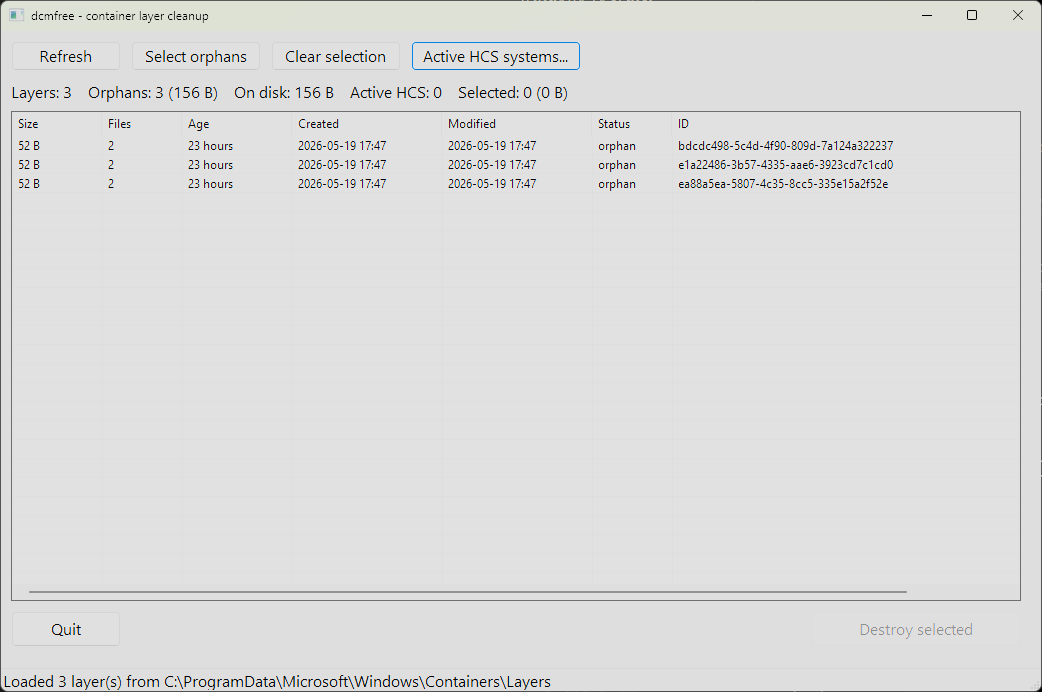
The GUI listing three orphan layers under the HCS layers directory, each reported with its size, age, status, and ID.
What I learned from windows-rs
The windows crate exposes Win32 as typed Rust bindings generated from the official Windows metadata. A few things stood out:
HRESULTresults auto-convert intowindows::core::Result, so the FFI surface ends up looking like ordinary Rust error handling.- Handles like
HCS_OPERATIONandHLOCALare proper newtypes, not*mut c_void, which makes it much harder to mix them up. PCWSTR/PWSTRmake NUL termination a type invariant. You still have to own the underlying UTF-16 buffer for the duration of the call, but the type signature is honest about what it wants.- Module organisation does not always follow the C headers. Microsoft documents
HcsDestroyLayeras living inComputeStorage.dll, so I went looking for aHostComputeStoragemodule inwindows 0.60— there isn’t one. The function is there, just bundled intowindows::Win32::System::HostComputeSystemalongside everything else with anHcsprefix.
Every Win32 handle is RAII-wrapped (OwnedToken, HcsOperation, OwnedComputeSystem, OwnedLocalAlloc), so a panic mid-destroy still closes everything. Every unsafe block has a // SAFETY: comment. It is a small program but it gave me a reason to be careful about what the operating system actually owns and what Rust does.
The source and prebuilt binaries are on GitHub. MIT licensed.